

.svg.png)

How to Create an AI-Powered Knowledge Base

Creating an AI-powered knowledge base is very advantageous for companies that want to increase efficiency in customer service and support processes. In this blog post, we will explain step by step how to create an AI-powered knowledge base.
Why It's Important for Companies to Use an AI-Powered Knowledge Base

Some of the key benefits of AI-powered knowledge base building for companies are:
- Productivity Increase: AI-powered systems lighten the burden on the customer service team and allow them to focus on more complex problems. This makes customer service processes faster and more efficient.
- Cost Reduction: AI-powered knowledge bases provide automated responses to repetitive questions, reducing the workload of customer service representatives. This leads to a reduction in personnel costs contributes.
- 7/24 Support: The AI-powered knowledge base can be available around the clock. In this way, customers can access the information they need at any time.
- Consistency and Accuracy: AI gives consistent and accurate answers to the same questions. This in turn improves the quality of the customer experience and ensures customer satisfaction.
- Comprehensive Analysis: AI analyzes customer interactions, providing valuable insights into frequently asked questions and problems encountered. This data contributes to the development of products and services.
What are the main elements of the Knowledge Base?
Database
It is the basic building block of the Knowledge Base. Content such as customer questions and answers, guides and frequently asked questions is stored here.
Search Function
An effective search engine that allows users to quickly find the information they need.
AI Module
Artificial intelligence algorithm that offers optimal answers by analyzing customer questions.
User Interface
A design that customers can easily use and quickly access the information they need.
Feedback Mechanism
Continuous updating and improvement of the knowledge base with feedback from customers.
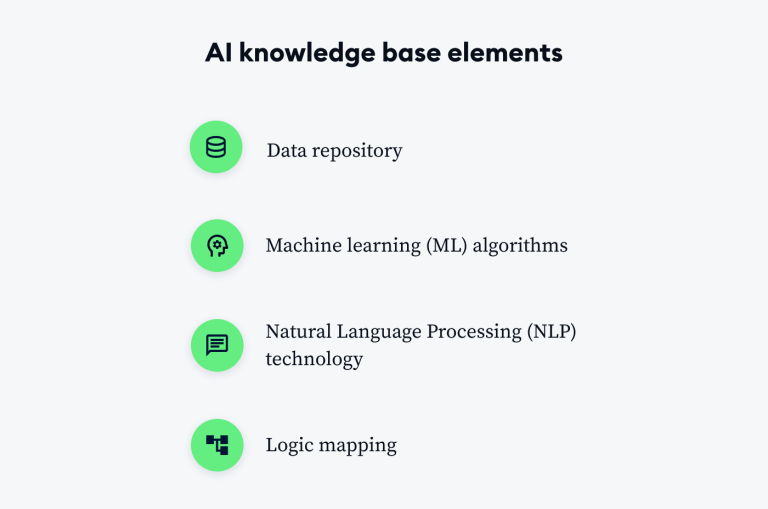
So how to build an AI-powered knowledge base? Here is our step-by-step guide:
1. Set Your Goals
Setting goals ensures your AI-powered knowledge base is effective and successful. When the right goals are not set, it becomes difficult for your knowledge base to achieve its purpose. Setting your goals offers focused solutions.
The first step is to determine what purposes your AI-powered knowledge base will serve. When setting your goals, you can ask yourself these questions:
- What are the most common problems customers face?
- What information do you want to share in your knowledge base?
- How can you improve the customer experience using AI technology?
2. Collecting and Organizing Content

You need to collect content that will form the basis of your knowledge base. These contents can be frequently asked questions, product manuals, technical support documents, and training materials. Once you have collected the contents, organize them by categorizing them. Categorization allows customers to quickly get the information they need.
3. Train AI Model
Proper training of the AI model is critical for the AI-powered knowledge base to work effectively. This step is necessary for the model to be able to give accurate and meaningful answers. Here are the details of this process:
Data Preparation
A large amount of data is required to train the AI model. This data can be obtained from a variety of sources such as customer requests, previous support interactions, and frequently asked questions. Cleaning and organizing data is the first stage of the model's educational process.
Training Datasets
The data is divided into training datasets. These sets allow the model to gain knowledge and make decisions on specific issues. For example, a training set with frequently asked questions and answers can be prepared for a customer support bot.
Model Selection and Training
Selecting and training the appropriate AI model is critical to the success of the knowledge base. Natural language processing (NLP) and machine learning algorithms are used to understand texts and generate responses. The model learns from training datasets and begins to give more accurate answers over time.
Testing and Validation
After the training process is completed, the model is tested. During the testing phase, it is assessed how well the model performs in real-world scenarios. This stage is important to improve the accuracy and reliability of the model.
Continuous Development
AI models are open to continuous learning and development. Once user interactions and feedback have been collected, the model is regularly updated and retrained. This allows the model to give more accurate and effective responses over time.

Top 10 knowledge base software to access our content click here.
4. Design User Interface
The effectiveness of the AI-powered knowledge base depends on the design of the user interface. A well-designed interface allows users to easily access information and improves the overall experience. Here are some elements you need to consider in user interface design:
User Friendly Design:
The interface should allow users to quickly and easily access the information they need. A simple and straightforward design makes it easy for users to get to the information they are looking for.
Search Functions:
The search bar and filtering options help users get to specific information quickly. AI-powered search features enable users to achieve optimal results by searching by keywords.
Presentation of Responses:
How information is presented affects the user experience. Answers should be clear and understandable, avoiding complex technical terms and jargon. Regulations such as flashcards or frequently asked questions facilitate access to information.
Mobile Compatibility:
The compatibility of the interface with mobile devices allows users to access information from any device. Mobile-friendly design improves user experience and increases accessibility.
Feedback and Support:
It is important to provide a mechanism through which users can give feedback about the interface and get support. This mechanism ensures continuous improvement of the interface and increases user satisfaction.
If you want to get detailed information about creating a knowledge base in our article you can browse.
5. Keep Content Up to Date

In order for a knowledge base to be effective, it is essential that the contents are constantly kept up to date. The content being out of date may lead to users receiving incorrect or incomplete information. Here are some suggestions for you to keep the content up to date;
- Regularly reviewing and updating: The content of the knowledge base should be reviewed at regular intervals.
- Adding new content: Adding information about new products, services, or process changes gives users access to up-to-date information. The process of adding content expands the scope of the knowledge base and keeps it up-to-date.
- Automatic updates feature: Some knowledge base systems offer features that allow content to be updated automatically. Such automations ensure that certain information is regularly updated and reduces the need for manual updating.
6. Evaluate Customer Feedback
Improve your knowledge base, taking into account the feedback of your customers. Feedback will help you identify and edit missing or incorrect information. You can also make your knowledge base more effective by focusing on the information that customers need most.
Users can give feedback on shortcomings and errors in the knowledge base. This feedback is an important resource for updating and improving content. Analyzing user feedback and making the necessary changes increases the effectiveness of the knowledge base.
7. Integration of AI Technology
Proper integration of AI technologies is important to increase the effectiveness of the AI-powered knowledge base. AI integration greatly improves the performance of the knowledge base and user experience. Here is the detailed information on the integration of AI technology:
Natural Language Processing (NLP)
The integration of natural language processing (NLP) technology in AI systems is used to understand and analyze texts. NLP is necessary to accurately understand the questions asked by users and to generate appropriate answers. This technology analyzes the contents of the knowledge base, producing meaningful results and better responding to users' queries.
Machine Learning
Machine learning algorithms enable the knowledge base to perform better over time. The AI system continuously improves responses and content by learning from user interactions and feedback. This process helps the knowledge base to provide more accurate and meaningful answers.
Chatbot Integration
AI-powered chatbots can interact with users by integrating into the knowledge base. Chatbots can provide automated responses to frequently asked questions and refer more complex issues to the support team. Chatbots increase the accessibility of the knowledge base and allow users to get help quickly.
Integrated Search Engines
AI-powered search engines provide quick and accurate access to content in the knowledge base. These technologies use AI algorithms to understand the user's search query and deliver optimal results. Integrating search engines speeds up the process of users getting to information.
Personalization
AI technologies can be used to personalize the user experience. The information base content is personalized in line with users' previous interactions and preferences. This method gives users access to more relevant and meaningful information and increases overall satisfaction.
An AI-powered knowledge base is an effective tool for optimizing your customer support processes and increasing customer satisfaction. By following the steps mentioned above, companies can gain a great advantage in customer relationship management. By building your knowledge base powered by AI technology, you can enjoy delivering fast and accurate responses to your customers.
What Are the Best Knowledgebase Softwares?
- Grispi
- Zendesk Guide
- Freshdesk
- Confluence (Atlassian)
- Helpjuice
- KnowledgeOwl
- Document360
- Guru
- Helping Scout Docs
- Zoho Desk
The best AI-powered customer support software of 2025 you can find it here.
You can contact us to try Grispi for 14 days free.
Contact Us
Fill in the form for detailed information and demo account and we will call you.
Müşteri deneyimi için çözümler
Çok kanallı destek, satış otomasyonu ve yapay zeka gücünü tek bir platformda birleştirin. Operasyonel verimliliği artırarak müşteri sadakatini güçlendirin ve ölçülebilir sonuçları hemen görmeye başlayın!
