
.svg.png)

What is a ticket system?

Today, customer experience has become one of the most important elements that determine the difference between brands. Increased channel diversity, intense demands and prospects for rapid resolution require companies to manage support operations more systematically and efficiently. At this point, which comes into play ticket system or by any other name support request systemstransforms customer demands into a traceable, measurable and organized structure.
What is the Ticket System?
One of the most used tools by companies that want to make customer support processes more organized, traceable and efficient is the ticket system or support request system. This system records every request from customers as a “ticket” and ensures that it is tracked until it is resolved. Instead of scattered email, phone or social media messages, aggregating all requests in one central point provides solutions that improve support teams' performance while also increasing customer satisfaction.

How to use the ticket system?
Ticket systems usually operate on a cloud-based basis. When a customer creates a support request, the system records that request with a unique ticket number. The claim can be assigned to the relevant department, followed by their status (new, open, pending, resolved, closed), the process is terminated by responding to it by the authorized person. Some systems also include additional features such as internal notes, prioritization, and SLA tracking for customer representatives.
What are the types of tickets?
Ticket systems can categorize requests to respond to different needs. The most common types of tickets:
- Question: Request for information.
- Problem (Problem): An unexpected failure of a service or product.
- Incident (Incident): Situation requiring urgent intervention.
- Feedback: Suggestions or criticisms about user experience.
- Call/RequestA request for a new service or information.
If you are looking for detailed information about the HR ticket system Let's take you like this.

How does the ticket system provide benefits?
- Traceability: Each request is numbered and its status can be monitored from the system.
- Productivity: Enables organized work of multiple agents at the same time.
- Reporting: It can be measured when, by whom and in how long claims are resolved.
- Transparency and accountability: Customers can see at what stage their demand is.
In which areas is the ticket system used?
- Technology and software companies
- E-commerce platforms
- Financial and insurance institutions
- Cargo and logistics companies
- Public institutions and municipalities
- Educational institutions
Why Use a Ticket System?
Whether you are a small business or work in a corporate structure with hundreds of customers, managing customer requests in a fast and organized manner is no longer a luxury but a necessity. Attempting to manage incoming requests through traditional methods, such as email or telephone, often leads to missed requests, delayed solutions, and decreased customer satisfaction. The ticket system eliminates this clutter.
In addition, using a ticket system not only records requests, but also makes your processes more transparent and measurable. Critical metrics such as the status of each support request, resolution time, and assigned personnel can be monitored instantly. This helps management teams make better decisions.
Free Ticket System Applications
1. Grispi
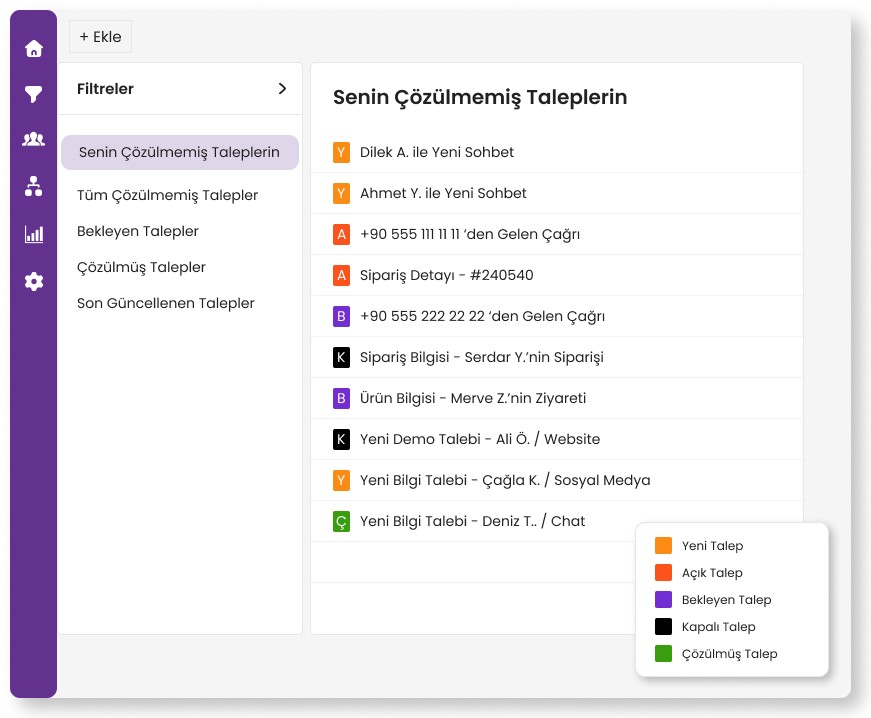
Grispi offers a modern and user-friendly ticket system that allows you to manage all your support requests from a central panel. It is equipped with features such as multi-channel integration (WhatsApp, email, social media, etc.), automatic assignment, SLA tracking, internal memos and very detailed reporting.
Grispi enables your agents to work more organized, respond to customer requests faster, and managers can track performance instantly.
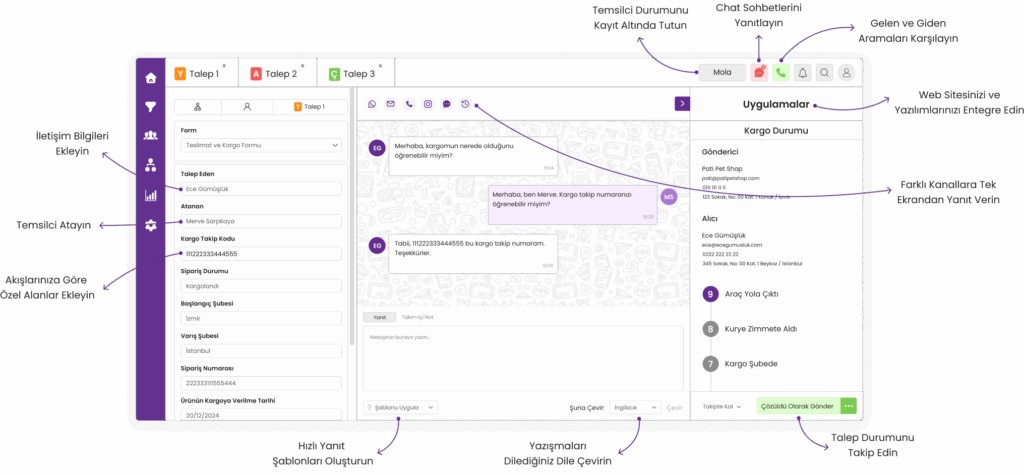
In addition, Grispi allows you to define automated actions based on the status of support requests. For example, you can create alerts for unanswered requests within 24 hours, and direct certain types of tickets directly to the relevant department. Thanks to advanced filtering and search functions, you can find what you are looking for among hundreds of requests in seconds.
Thanks to the extensive 14-day trial process, you can experience all the capabilities of the platform and start using the system in minutes without any installation required. It offers an ideal solution for both small teams and large teams.
2. Zoho Desk
Zoho Desk is a platform that offers multi-channel support and comes with a 15-day free trial. It stands out for its simple interface for SMEs and automation options.
10 alternative customer support systems to Zoho Desk you can find it here.
3. Freshdesk
Freshdesk offers a 21-day free trial with its easy-to-use interface. It has email, phone and social media integrations. Suitable for simple support management.
4. LiveAgent
LiveAgent offers multi-channel support, and a 14-day free trial is available. It offers chat, email and social media integration, but some features may be limited in the trial process.
5. HubSpot Service Hub
HubSpot's support module is advantageous thanks to its integrated work with CRM. There is a 14-day trial process. It is more suitable for large teams.
Ticket systems improve both team order in customer support processes and take customer satisfaction three steps further. Especially with modern, user-friendly and transparent reporting platforms like Grispi, you can manage your support requests both more efficiently and more professionally. Moreover, without taking any risk to try it, you can start with a 14-day free trial.
Contact Us
Fill in the form for detailed information and demo account and we will call you.
Müşteri deneyimi için çözümler
Çok kanallı destek, satış otomasyonu ve yapay zeka gücünü tek bir platformda birleştirin. Operasyonel verimliliği artırarak müşteri sadakatini güçlendirin ve ölçülebilir sonuçları hemen görmeye başlayın!
